System Configurations for Kanbanoo

Enabling the so-called Bouncy Fix


Context


This setting is only available in Kanbanoo v2.15.0 or later. It applies only to new (vNext) M-Files clients, not to classic clients.

Motivation


In certain versions of M-Files the New Client had a visual glitch when displaying dashboard applications like Kanbanoo – the dashboard would be partially obscured and jump up and down when scrolling. As a (temporary) fix we had implemented a “bouncy fix” (developed by CtrlDocs and kindly shared with us!). Because M-Files have resolved their defect ID CE-1638 in version 25.12 (after it had reappeared in 25.11), this fix is no longer automatically applied in Kanbanoo v2.15.0. However, should you be running an older version of M-Files you may want to enable it.

What It Will Do


The Bouncy Fix will hide part of the M-Files user interface with the breadcrumb, name of the current view, and the Search in this view control. In the M-Files client versions exhibiting the bug, the breadcrumb and current view name were also displayed in the top blue bar of M-Files.

How to Enable the Fix

Open M-Files Admin, navigate to your vault, then to Configurations, select Other Applications, then Kanbanoo.

Select the Configuration, then New Web and Desktop Clients subtree, and set Enable Bouncy Fix to Yes.

Clients must log out and log in again for the setting to take effect.
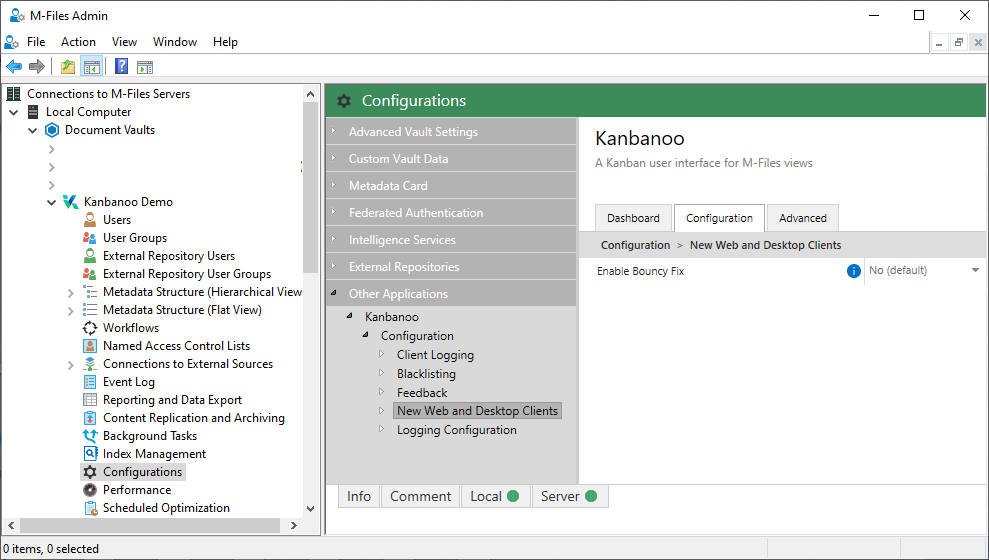
Applications window of M-Files Admin


If you encounter any problems please write to support@kanbanoo.com to ask for help.